

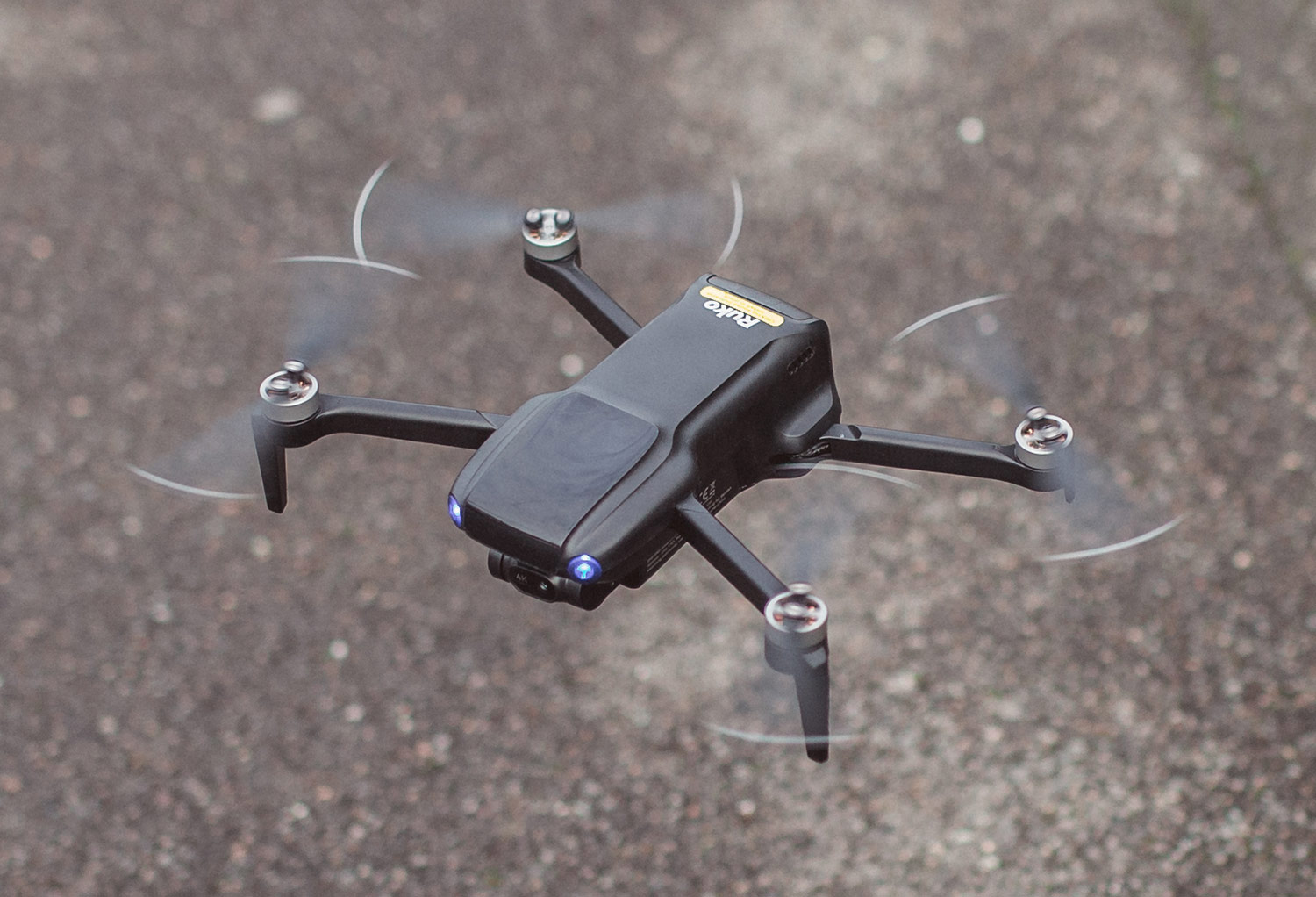
Ruko U11MINI 4K Drone Review
One of the most popular tech toys currently on the market is a drone, allowing you to fly high above local buildings and trees, swooping across the landscape while capturing amazing images and videos to record the moment. In my latest review, I will check out the U11MINI 4K from Ruko. Let’s find out more!
Check Out The Ruko U11MINI 4K Here
Ruko is an innovative brand that offers a wide range of cool products in its collection, from mini-robots and remote-controlled cars to, of course, drones. Each of their items boasts advanced tech, so you can enjoy their devices and take advantage of their excellent lifestyle features.
For this review, I selected one of their flagship drones—the U11MINI 4K. If you want to find out more, then carry on reading.

Style & Design
The U11MINI 4K easily ticks those style boxes—it delivers a futuristic look (you could easily imagine it in the latest sci-fi blockbuster) with its sleek black colour. Even the propellers opt for this dark hue (albeit with a white strip on each tip). Once the drone is switched on, you are greeted by glowing blue lights (the hallmark of a modern digital product).
The control unit uses a complementary colourway, black with touches of grey. Fortunately, the device takes a minimalist approach, with only the essentials on show (including the joysticks and operation buttons). Similar to the drone itself, once turned on, you will see welcoming green and blue lights, indicating that everything is connected and working correctly.
Set Up
Ruko has made it very simple to set up your new drone and start flying! Begin by removing the battery pack from the drone and fully charging it at a wall socket using the provided cable (plug it into a standard USB port). During your wait time, download the appropriate app to your smartphone using the QR code in the instructions (either Apple or Android).
Once fully charged, slot it back into the drone, and you are ready to go! Remove the gimbal cover from the front of the device, then turn on both the drone and the remote controller (it takes about 30 seconds to pair). Next, raise the phone holder at the top of the controller, connect the correct cable to your phone (micro USB, USB-C, or Lightning connector), and slot your smartphone in securely.
Open the app on your phone, and your phone’s GPS will automatically link with the app/drone.

Operation
Now that everything is set up, you can take your new purchase for a spin in the air! Start the motors by pushing both joysticks to the 5 and 7 o’clock positions, respectively. After a couple of seconds, the blades will start to spin. Push the left stick up, and the drone will lift off the ground.
The left stick is responsible for adjusting altitude and nose direction (up/down and left/right rotation). The right stick controls flight direction (forward/backwards and left/right).
If you are a newbie in the world of drone flying, you can even switch on ‘beginner mode’, which will automatically return the drone to you and land itself without any issues that you may encounter with your first sky adventure.
On the controller, you will find a number of extra buttons –
- Photo/record button: allows you to take photos or start recording video during flight.
- Auto-cruise control: take advantage of the built-in cruise mode (giving you a break from the controls).
- Camera One-touch adjustment/Flight mode switch: this button performs dual functions: adjusting the camera and entering indoor altitude mode.
- One-key return: with one click, the drone will automatically return to the takeoff location.
- Speed adjustment: allows you to change the drone’s velocity (3 available speed settings).
Technical Specifications
The U11MINI 4K comfortably sits in the high-end market and, as expected, delivers a wide range of fantastic options for the keen flyer! The tech specs are as follows –
- 20,000ft Range Digital Real-time Transmission
- Long Distance Control
- Video Capture Resolution: 4K
- Effective Still Resolution: 48 MP
- Connectivity: USB
- Micro SD card slot
- 1/2-inch CMOS Sensor
- 3-Axis Brushless Gimbal and EIS Stabilisation
- 96min Long Battery Life (32 minutes for each battery).
- Extended Flight Time
- Al Takeoff/Landing System
- GPS with Beeper
- Barometric Altitude Hold
- TOF (time-of-flight)
- Optical flow (navigation technology)
- Weight under 249g
Package contents –
- Advanced Controller x1
- Carrying Case x1
- Extra Propellers x4
- USB Cable x3
- Screwdriver x1
- Screws x11
- User Manual x1
- Intelligent Flight Batteries x3

Value For Money
Drones are undoubtedly a pricey toy for the modern tech-lover. They typically command a high price point (unless you choose a first-timer budget option), and the U11MINI 4K is no different in this regard.
Ruko offers several options, depending on your individual needs – starting with the standard HD version (with batteries), then moving up to the 4K version (with either a 32-minute or 96-minute flight time, thanks to the additional batteries). Each has a suitable price point: the HD version is available for just over $250, while at the other end of the scale, the 4K 96-minute version is around $500.
Despite the initial outlay, once you are the proud owner of this top-tier drone, you will soon forget dropping such a high amount on a “toy” as you will be having far too much fun flying around your local area (and beyond!).
For reference, the model reviewed here is the 96-minute specification.

Packaging
The box is a standard design (but it never needs to be more than that), and it displays all the necessary information (images, tech specs, etc). Once opened, you will discover your brand-new drone safely secured in protective housing, with each essential element individually wrapped for safety during shipping.
Additionally, Ruko has provided a fabric case to store your drone when not in use, which also doubles as a travel case so you can easily (and safely) transport the U11MINI 4K further afield (which is ideal if you want to travel abroad to capture amazing landscapes and beautiful coastlines).
Final Thoughts
The Ruko U11MINI 4K drone is a brilliant bit of kit suitable for newcomers and veterans alike! It is small and lightweight (FAA-exempt—so you can typically fly without restrictions, although always double-check with your region’s laws!), and looks stylish and modern with its sharp lines and black finish.
Each full charge will provide up to 96 minutes of uninterrupted flight time, so you can enjoy whizzing around in the sky without worrying about a sudden loss of power. Even so, the package includes three batteries so that you can carry backups in the carry case for longer air-based escapades. The built-in 8K photo and 4K video will let you capture fantastic visuals you can cherish and share with family and friends (or even on social media). Your media is recorded on a microSD card slot (up to 128 GB).
The device is easy to use; once set up, you’re golden. You can quickly take it for a whirl (and the beginner mode will protect the drone if you are unsure with your first few flights), and the 20,000 feet range allows you to reach fantastic distances with ease (the tracking system will ensure it returns to you safely if any signal/weather issues are encountered).
I definitely loved my time with the Ruko U11MINI 4K, and I wholeheartedly recommend it if you are in the market for a drone. Head on over to their collection today and see for yourself! You won’t be disappointed!
Will you be investing in this fantastic kit from Ruko? Please share your thoughts below.
Click Here For The Complete Ruko Collection
*Partnership with Ruko / Opinions are my own.


